


How Bright works
A decision this important deserves more than a list.
Understand your options, compare what matters, and build a preference strategy around your goals.
- Step 1
Understand the student
Goals, course interests, exam context, budget, location preferences and constraints. We offer a route for students who don't yet know their course, and we tell you which information is optional.
- Step 2
Check the starting position
Profile completeness, documents and the counselling routes that apply. Anything missing or inconsistent is flagged early, and you can see what has been checked.
- Step 3
Research and compare
Source-linked college information, historical cutoffs, fees, location and programme details. We explain uncertainty and why a college or branch is on your list.
- Step 4
Build a preference strategy
College versus branch, affordability and location, turned into a personalised list from our engines and refined by your counsellor. You confirm every consequential choice.
- Step 5
Support the rounds
Schedules, documents, choice filling, allotment decisions and reporting, tracked as completed, pending or needing your action.
- Step 6
Close the loop
Record the outcome, clarify the next administrative step and make sure you know where to get support.
Online one-on-one counselling
Your counsellor, from anywhere.
No need to visit an office. Registered students book a private session on Bright's booking site and meet their counsellor on Google Meet, from home, hostel or anywhere in India.
- 10–20 minute focused sessions
- Just you and your counsellor
- Google Meet video call
- No office visit needed
-
1
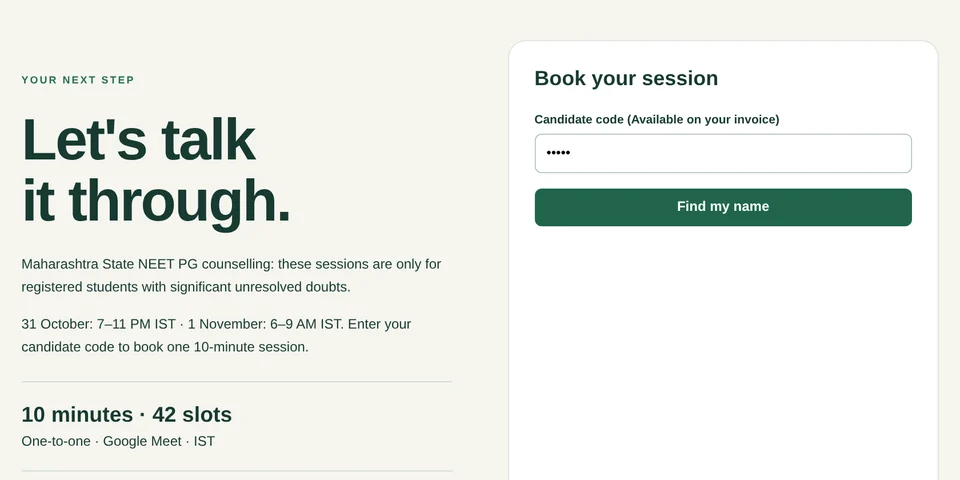
Enter your candidate code
Open booking.brightedu.org.in and enter the candidate code from your Bright invoice. Your name is found for you.
-
2
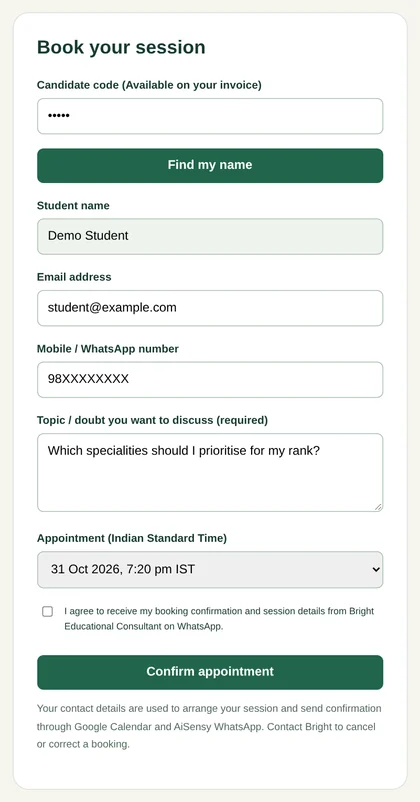
Pick a slot, share your doubt
Choose a time in IST and tell us what you want to discuss. Confirmation comes by Google Calendar and WhatsApp.
-
3
Meet on Google Meet
Join from your phone or laptop at your booked time, with your rank, preferences and questions ready.
Clear responsibilities
Who does what
You
- Share accurate details and documents
- Confirm your final choices
- Complete payments and reporting on time
Bright
- Explain options and rules
- Build and refine your preference list
- Track rounds and remind you of actions
Admission authority
- Sets eligibility, dates and rules
- Allots seats
- Publishes official results
Bright never controls allotments. We help you make the strongest, best-informed choices.
Start with step one
Tell us where you are, and a Bright counsellor will take it from there.